Wavlink 20-In-1 Enterprise-Level Universal Docking Station, USB-C Quad 4K@60Hz Display, Universal Dock for MacBook and Windows with Max 100W Power Delivery/100W DC Charging, Dual 5K@60Hz(for Windows 10), Displaylink Dock with 4xDisplay Port(1.2), 4xHDMI(2.0), 2.5G Ethernet, 10Gbps USB 3.1-A(BC1.2 Fast Charging), USB-C(PD30W, No Data), SD/TF Slot(SD 4.0), 3xUSB 3.0-A, 9 Interchangeable Power Tips Included(Black)
  • Wavlink 20-In-1 Enterprise-Level Universal Docking Station, USB-C Quad 4K@60Hz Display, Universal Dock for MacBook and Windows with Max 100W Power Delivery/100W DC Charging, Dual 5K@60Hz(for Windows 10), Displaylink Dock with 4xDisplay Port(1.2), 4xHDMI(2.0), 2.5G Ethernet, 10Gbps USB 3.1-A(BC1.2 Fast Charging), USB-C(PD30W, No Data), SD/TF Slot(SD 4.0), 3xUSB 3.0-A, 9 Interchangeable Power Tips Included(Black) 1
  • Wavlink 20-In-1 Enterprise-Level Universal Docking Station, USB-C Quad 4K@60Hz Display, Universal Dock for MacBook and Windows with Max 100W Power Delivery/100W DC Charging, Dual 5K@60Hz(for Windows 10), Displaylink Dock with 4xDisplay Port(1.2), 4xHDMI(2.0), 2.5G Ethernet, 10Gbps USB 3.1-A(BC1.2 Fast Charging), USB-C(PD30W, No Data), SD/TF Slot(SD 4.0), 3xUSB 3.0-A, 9 Interchangeable Power Tips Included(Black) 2
  • Wavlink 20-In-1 Enterprise-Level Universal Docking Station, USB-C Quad 4K@60Hz Display, Universal Dock for MacBook and Windows with Max 100W Power Delivery/100W DC Charging, Dual 5K@60Hz(for Windows 10), Displaylink Dock with 4xDisplay Port(1.2), 4xHDMI(2.0), 2.5G Ethernet, 10Gbps USB 3.1-A(BC1.2 Fast Charging), USB-C(PD30W, No Data), SD/TF Slot(SD 4.0), 3xUSB 3.0-A, 9 Interchangeable Power Tips Included(Black) 3
  • Wavlink 20-In-1 Enterprise-Level Universal Docking Station, USB-C Quad 4K@60Hz Display, Universal Dock for MacBook and Windows with Max 100W Power Delivery/100W DC Charging, Dual 5K@60Hz(for Windows 10), Displaylink Dock with 4xDisplay Port(1.2), 4xHDMI(2.0), 2.5G Ethernet, 10Gbps USB 3.1-A(BC1.2 Fast Charging), USB-C(PD30W, No Data), SD/TF Slot(SD 4.0), 3xUSB 3.0-A, 9 Interchangeable Power Tips Included(Black) 4
  • Wavlink 20-In-1 Enterprise-Level Universal Docking Station, USB-C Quad 4K@60Hz Display, Universal Dock for MacBook and Windows with Max 100W Power Delivery/100W DC Charging, Dual 5K@60Hz(for Windows 10), Displaylink Dock with 4xDisplay Port(1.2), 4xHDMI(2.0), 2.5G Ethernet, 10Gbps USB 3.1-A(BC1.2 Fast Charging), USB-C(PD30W, No Data), SD/TF Slot(SD 4.0), 3xUSB 3.0-A, 9 Interchangeable Power Tips Included(Black) 5

Wavlink 20-In-1 Enterprise-Level Universal Docking Station, USB-C Quad 4K@60Hz Display, Universal Dock for MacBook and Windows with Max 100W Power Delivery/100W DC Charging, Dual 5K@60Hz(for Windows 10), Displaylink Dock with 4xDisplay Port(1.2), 4xHDMI(2.0), 2.5G Ethernet, 10Gbps USB 3.1-A(BC1.2 Fast Charging), USB-C(PD30W, No Data), SD/TF Slot(SD 4.0), 3xUSB 3.0-A, 9 Interchangeable Power Tips Included(Black)

Model: WL-UG69PD10

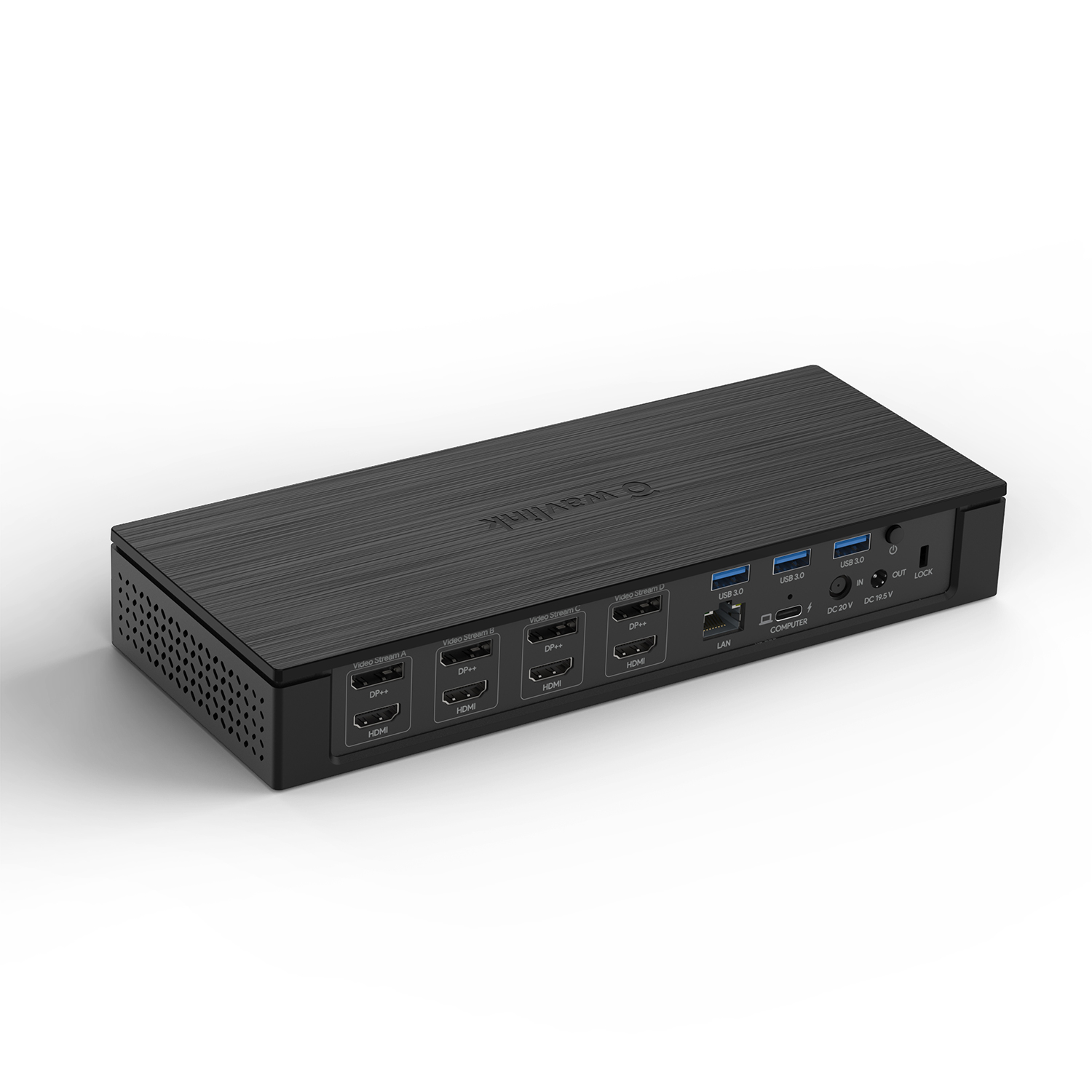
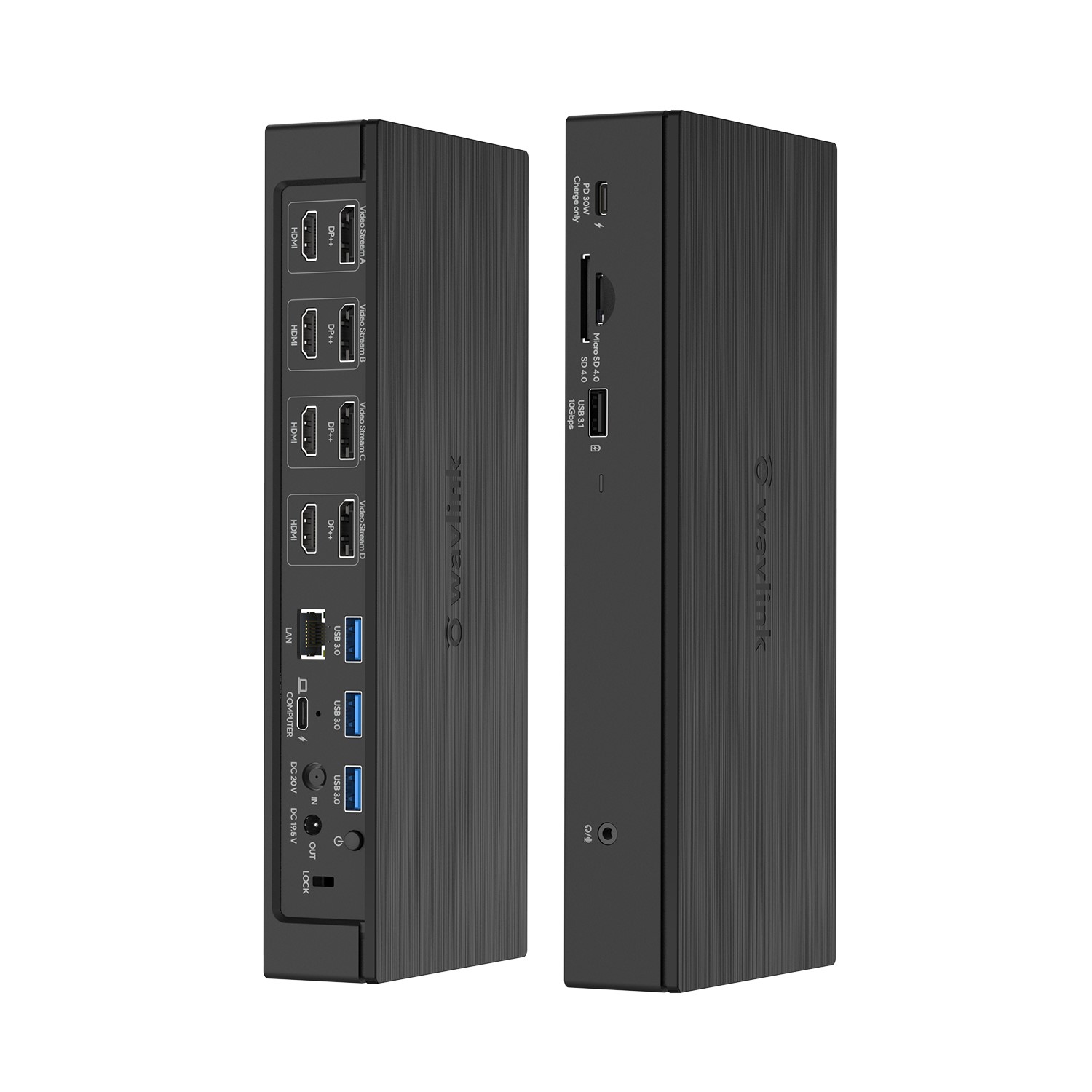
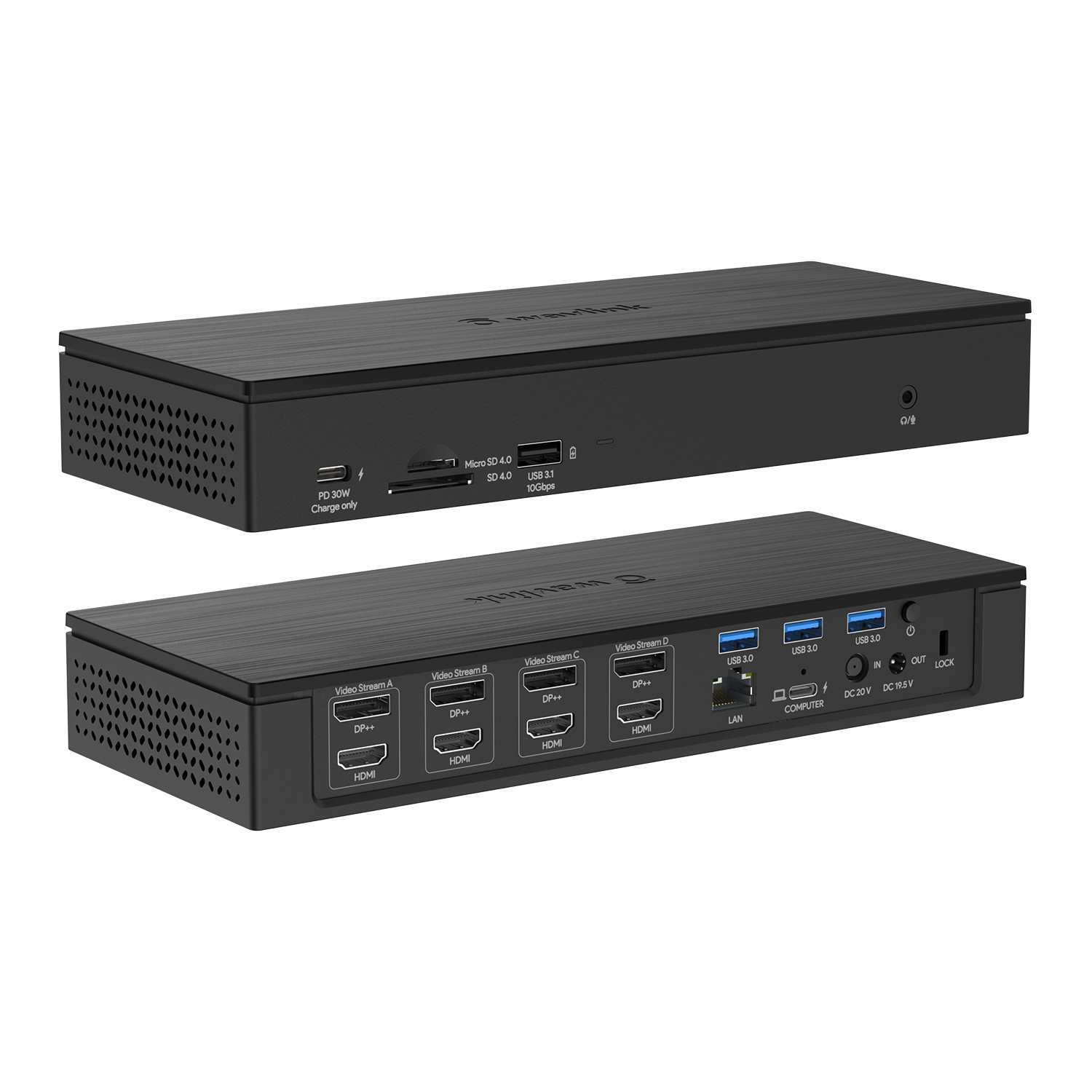
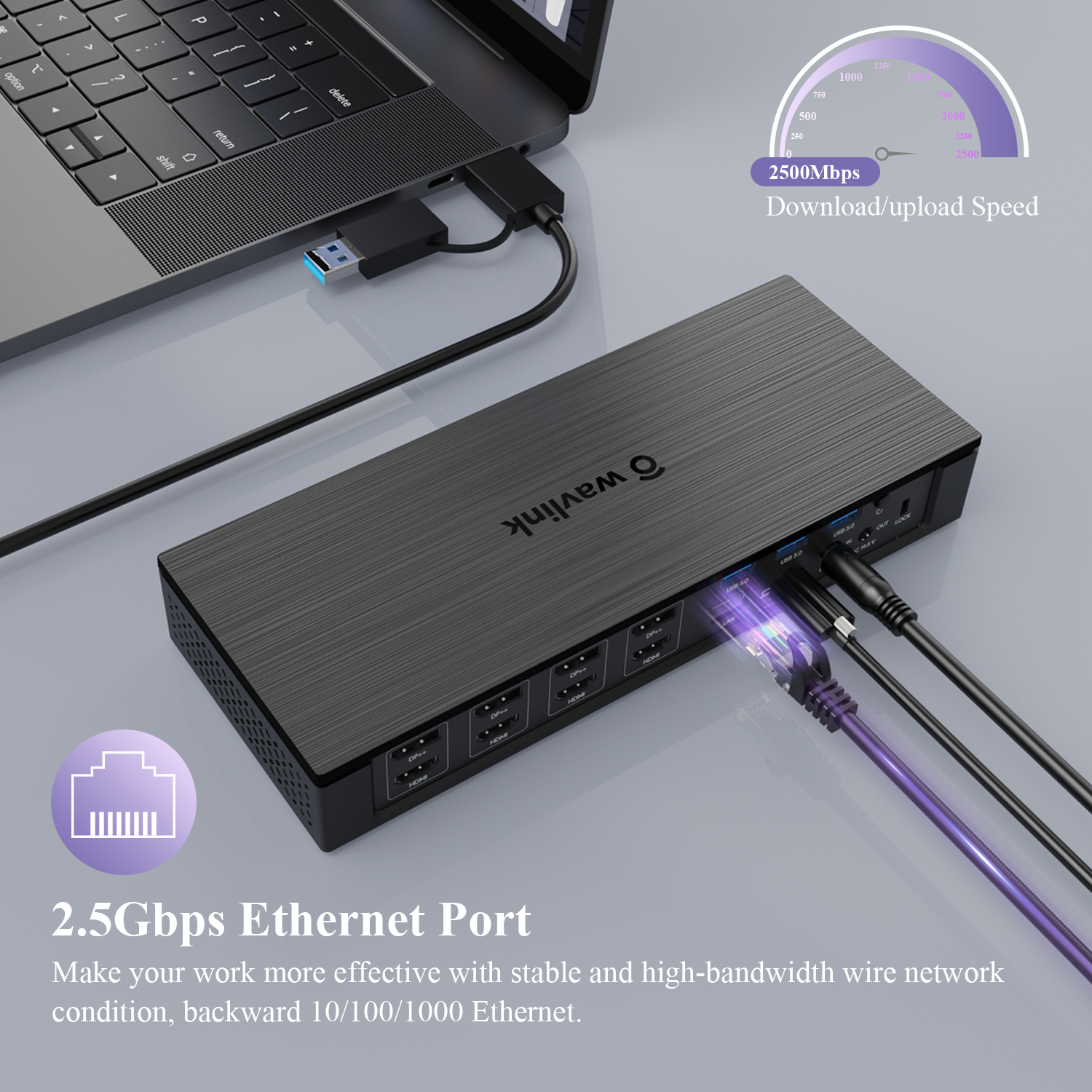
{20-In-1 Enterprise-Level Docking Station}: The Wavlink enterprise-level quad 4K universal docking station is an ideal choice for large enterprises and designers, which provides a total of 20 ports: 1 x DC in, 1 x DC out, 1 x USB-C(upstream), 4 x Displayport, 4 x HDMI, 1 x RJ45 Ethernet port, 1 x 4-Pole 3.5mm Phone Jack, 1 x SD Card Reader, 1 x TF Card Reader, 3 x USB3.0-A, 1 x USB3.1-A, 1 x Type-C(downstream, no data):  2.5Gbps Ethernet gives you high bandwidth networking; the SD/TF Card Slot supports speed up to 312MB/s for fast backuping your photos or movies; one USB3.1 Gen2 Type-A (10Gbps) supports BC 1.2 fast charging, and three USB3.0 Type-A (5Gbps) ports extend more connectivity to USB devices.
{Max PD 100W Charging for your PC}: Supported by power delivery 3.0, 180Watt power adapter provides maximum 100W power delivery to charge your computer. While using the docking, one upstream USB-C port on the back (PD 100W) for you to fast and securely charge your laptop while connecting multiple peripherals for data transferring and power storage.【Note: The USB-C port of your computer must support PD Charging.】 For downstream charging, another USB-C port on the front (PD 30W, No Data),  provides up to 30W charging for your mobile phone/pad or any USB-C devices which support USB PD charging, giving you a blazing-fast charging speed experience.
{Additional DC Output Charging }: With Type-C cable connection, which can provide up to 100W of Power Delivery charging for your computer while data transmission. While for those USB-A computers, computers without PD function, our Wavlink Universal Docking Station specially designs one extra DC output jack to supply power, accessories with 9 DC power tips that can be compatible with over 10 brands.(LAPTOP BRANDS COMPATIBLE: DELL/ HP/ ACER/ ASUS/ LENOVO/ CMOPAQ/ TOSHIBA/ FUJITSU/ GATEWAY/ IBM). It provides with a maximum 100W of 19V-20V power input to your computer without type-C port.【Note: The DC charging power of your laptop should not be higher than 100W, otherwise it will not be charged.】
    
{Quad 4K Display & Mirror/Extend Mode}: 4 HDMI ports and 4 DP Ports support quadruple 4K(3840x2160@60Hz) displays output, with the mirror mode(extra 4 same displays) and extend mode(extra 4 different displays) both supported for Windows OS and Mac OS. Connection Way: ①DP/HDMI(Video Stream A)+ ②DP/HDMI(Video Stream B)+ ③DP/HDMI(Video Stream C)+④DP/HDMI(Video Stream D), which will greatly help you facilitate high-resolution works, graphically intensive images, video editing, CAD drawings, medical imagery and more.【Note: You can only either connect the DP port or HDMI port within the same video stream; if you plug in both---DP will be working, HDMI will not.】
{Excellent Detail Designs}: Built-in heat sink with 76252mm² heat dissipation area enables stable operation even in 60℃ high temperature environment; the vents and anti-dust mesh on both sides form a convection heat dissipation channel to prevent dust and foreign objects from entering the docking station. Cable holder prevents the device from being disconnected suddenly; integrated lock slot accommodates standard security locks to safeguard equipment(Security lock is not included). What's more, a 2-in-1 USB-C to USB-C cable with USB-A converter included lets you just connect your USB-A port PC for data transferring(Charging Not Supported).
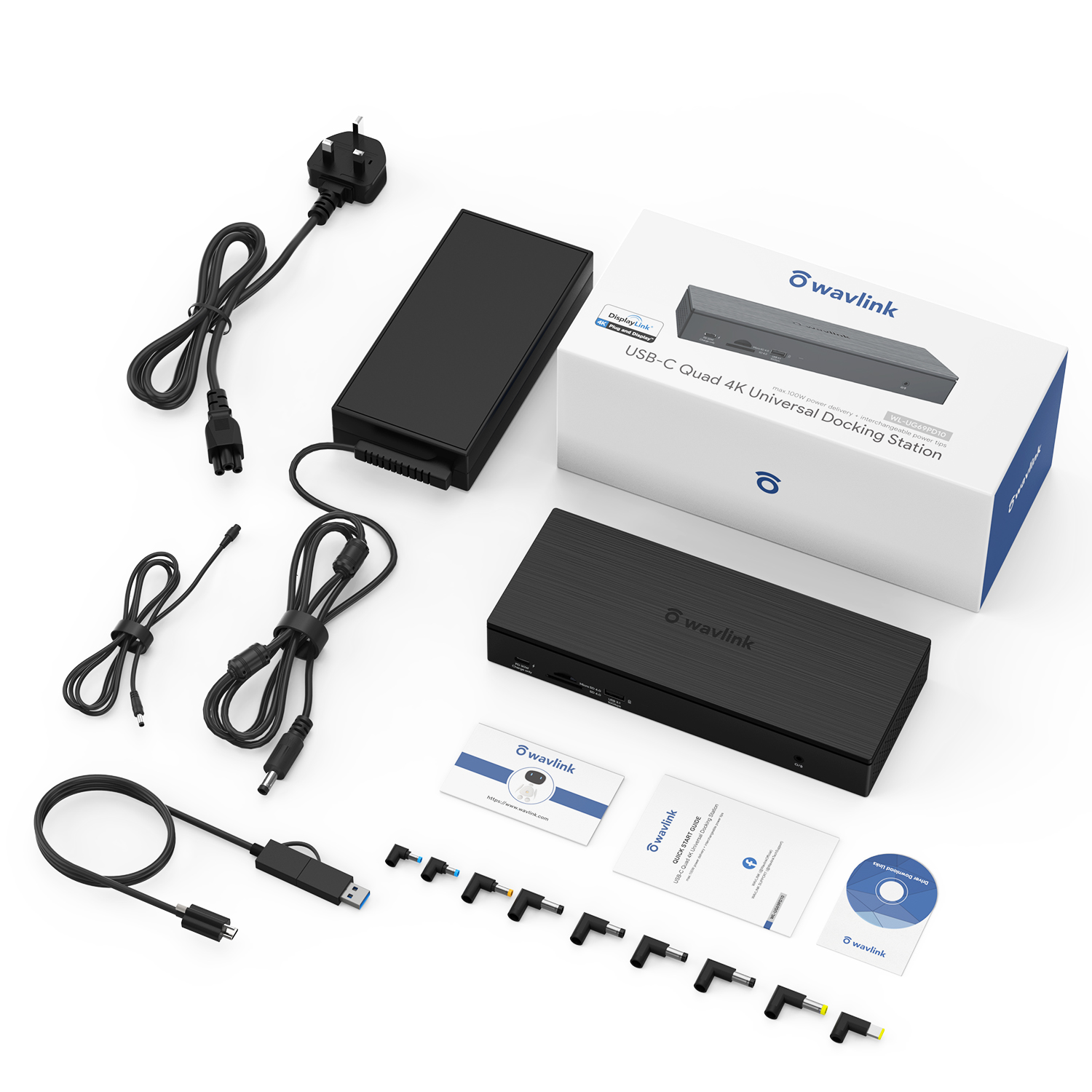
{Compatibility & What You Get }: Compatible Systems: Windows7/8/10(32/64-bit), Mac OS 10.8 or later, Chrome OS, Android, Ubuntu, performance might be limited on Ubuntu, Chrome OS and Android. What you get:1 x USB-C quad 4K universal docking station, 1 x 2-in-1 USB-C to USB-C cable with USB-A converter, 1x DC20V/9A 180W power adapter, 1 x AC power cable, 1x DC to DC converting cable, 9 x DC power tips, 1x Cable holder, 1x CD-shaped Driver Download Links, 1 x Quick start guide. 1-Year worry-free warranty (extra 6 months for registered members) and life-long friendly customer service and technical support. Tips:Wavlink Products come with high-quality after-sale service, please feel free to contact us anytime if you have encountered any issue.

Driver

Version:
DL_Displaylink
System Requirements:
Windows 10/11/Mac/Linux/Android
Download:

Manual

WL-UG69PD10 Manuals

Description : WL-UG69PD10 Manuals

Post Date : 20/11/2025

Available : WL-UG69PD10

Q&A

What should I do if the video ports of the docking are not working?

Please ensure that the DisplayLink driver for the dock is installed.

For macOS: Make sure you have installed the DisplayLink Manager App and granted permission for Screen Recording.

You can download the driver here :

DisplayLink macOS Software for Downloads Section | Synaptics

What should I do if the dock is not working as expected on a Windows computer?

Please follow the steps below:

1. Disconnect the dock from your computer and unplug the power cable to fully power it off. Keep it disconnected until the final step.

2. Uninstall any DisplayLink software from Control Panel > Programs and Features (if present).

3. Download and run the DisplayLink Cleaner Tool:

DisplayLink Installation Cleaner for Windows | Synaptics

4. Restart your computer (even if not prompted).

5. Download and install the latest DisplayLink driver:

Windows Driver Downloads for Downloads Section | Synaptics


6. Reconnect the dock’s power first, then connect the dock to your computer.

If the device is not detected during installation, click “Skip” to complete the process, then restart your system again.


Why does the DisplayLink Manager App request screen recording access on my MacBook?

macOS requires users to grant Screen Recording permission for the DisplayLink driver to function properly. The DisplayLink Manager App does not send any information to Wavlink or DisplayLink/Synaptics, so there is no need to worry.

Why can’t Apple TV, Hulu, or Netflix play when the docking station is connected?

1.The docking station does not support HDCP, so protected content from services like Apple TV, Hulu, and Netflix cannot be played while the dock is connected. This is expected behavior. Please disconnect the dock when playing these videos.

2.Alternatively, you can try

1)  Open Google Chrome settings.

2)  Click on "Advanced" and select "System."

3)  Disable "Use hardware acceleration when available"

4)  Select "Relaunch" to activate the new settings.

How can I stop the dock from charging my laptop?

Please use the USB-C to USB-A cable to connect the dock to your laptop.

This will prevent the dock from supplying power.

Top

Get the Scoop First

Subscribe to our official website to receive exclusive first-hand news and stay up-to-date on our new product releases and promotions!